
How to free a license seat when a user uninstalls your extension
A device-limited license should not stay taken by a browser that no longer has your extension. The uninstall webhook pattern: link the installation at license check, verify a Standard Webhooks signature, release the seat idempotently.
Updated November 20, 2026 · 5 min read · Markdown version
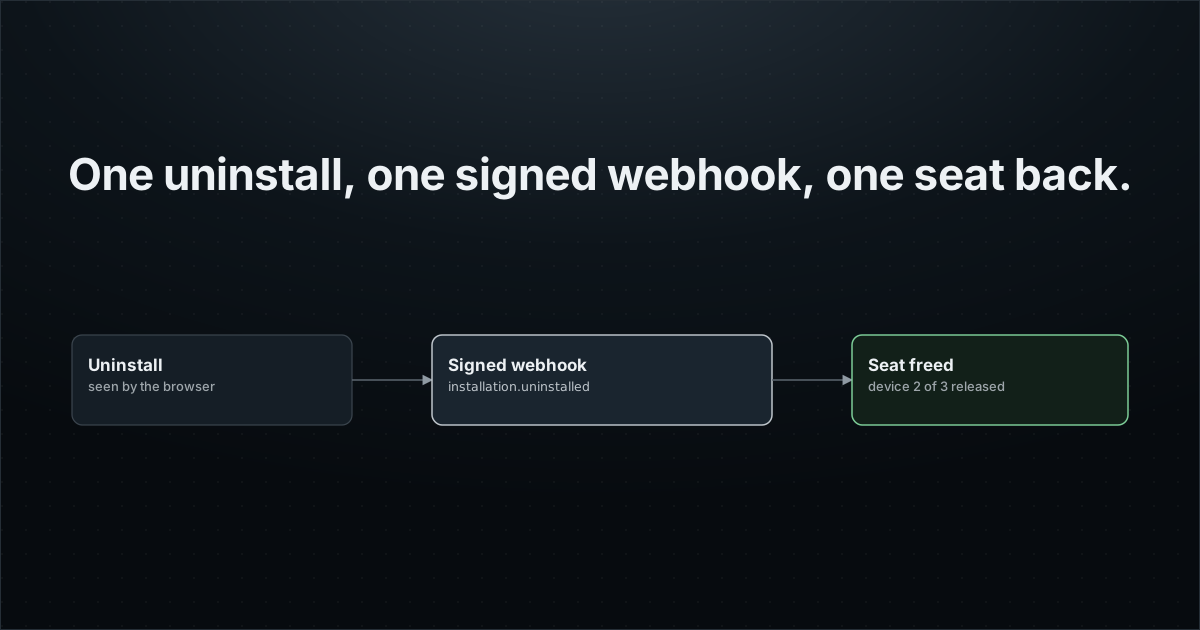
Your paid extension allows three devices per license. A customer removes it from an old laptop, installs it on a new one, and gets "device limit reached". They write to support, someone frees the seat by hand, and everyone loses a day.
The extension cannot tell your server it is being removed: its code stops first. This guide shows the pattern that solves it, step by step, with code for the extension and the backend. It is the setup running in production for a LinkedIn reading-mode extension with a device limit.
The pattern in one picture
Two systems each know half of the story. Your license server knows which device holds which seat. Extension Report knows when an installation was removed, because it owns the browser's uninstall URL. The installation id is the join key between them.
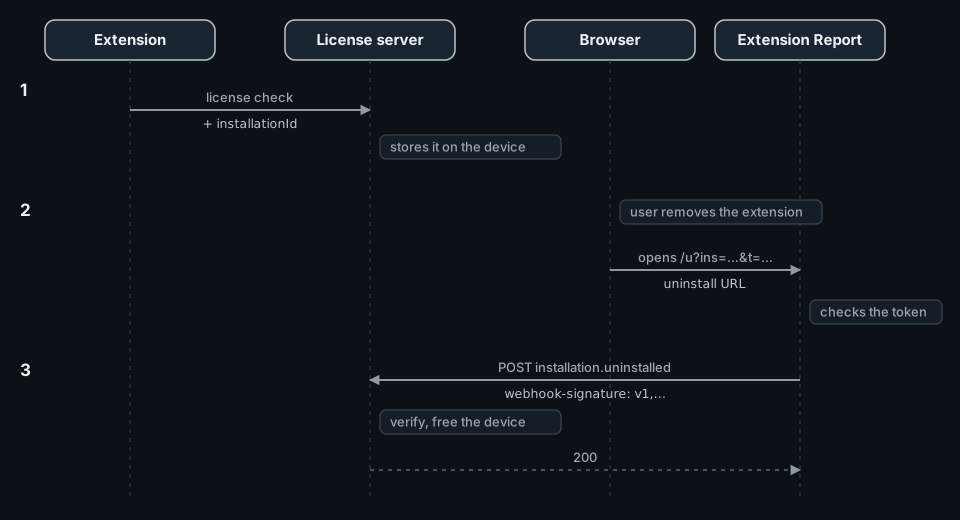
Why not put the license key in the uninstall URL and let your server read it? Because that URL is visible to the user, and anyone who knows its format could release someone else's device. In this pattern no secret of yours travels in the URL. Extension Report only fires after checking the uninstall token it issued to that installation, and only the extension itself can link an installation to a device, through your authenticated license check.
1. Link the installation at license check
The extension already calls your server to check its license. Add one field: the value of sdk.getInstallationId(). Do not let it slow or break the license check: give it a short timeout and send nothing when the SDK has no id.
// background.ts: next to the SDK initialization
async function getExtensionReportInstallationId(): Promise<string | null> {
  const timeout = new Promise<null>((resolve) => setTimeout(() => resolve(null), 1000));
  try {
    return await Promise.race([sdk.getInstallationId(), timeout]);
  } catch {
    return null;
  }
}

// In the license check you already make
const extensionReportInstallationId = await getExtensionReportInstallationId();
await fetch("https://api.example.com/license/check", {
  method: "POST",
  headers: { Authorization: `Bearer ${accessToken}`, "Content-Type": "application/json" },
  body: JSON.stringify({ deviceId, extensionReportInstallationId }),
});
On the server, validate the value (a short string of letters, digits, - and _) and store it on the device record of the signed-in caller, in the update you already make. Ignore it when it is missing or malformed. In the production case the field is optional and the license check never waits for it.
2. Verify the signature
Webhooks follow the Standard Webhooks specification. Each request carries three headers: webhook-id, webhook-timestamp and webhook-signature. The signature is an HMAC-SHA256 of <id>.<timestamp>.<raw body>, keyed with your whsec_... secret. During a secret rotation, two signatures are sent, separated by a space; accept either.
import { createHmac, timingSafeEqual } from "node:crypto";

// EXTENSION_REPORT_WEBHOOK_SECRET is the whsec_... value returned once by
// configure_uninstall_webhook, stored in the backend's secret manager.
export function verifyExtensionReportWebhook(
  rawBody: string,
  headers: Headers,
  secret = process.env.EXTENSION_REPORT_WEBHOOK_SECRET ?? "",
): boolean {
  const id = headers.get("webhook-id");
  const timestamp = headers.get("webhook-timestamp");
  const signatures = headers.get("webhook-signature");
  if (!secret || !id || !timestamp || !signatures || !/^\d+$/.test(timestamp)) return false;
  // Reject replays: more than 5 minutes away from now.
  if (Math.abs(Date.now() / 1000 - Number(timestamp)) > 300) return false;
  const key = Buffer.from(secret.replace(/^whsec_/, ""), "base64");
  const expected = createHmac("sha256", key).update(`${id}.${timestamp}.${rawBody}`).digest();
  // Space-separated "v1,<base64>" values: two during a secret rotation.
  return signatures.split(" ").some((candidate) => {
    const [version, value] = candidate.split(",", 2);
    if (version !== "v1" || !value) return false;
    const received = Buffer.from(value, "base64");
    return received.length === expected.length && timingSafeEqual(received, expected);
  });
}- Verify the raw body, before parsing. Key order is not guaranteed, so re-serialized JSON will not match.
- Reject a timestamp more than five minutes away from now: it blocks replays.
- The official
standardwebhooksnpm package does the same check:new Webhook(secret).verify(rawBody, headers).
3. Release the device, idempotently
Delivery is at least once. A timeout on your side, a retry, or a manual resend from the dashboard can deliver the same event twice, with the same webhook-id. The simplest safe design is a release that finds nothing the second time.
// POST /api/extension-report/webhook
const MAX_BODY_BYTES = 64 * 1024; // events are a few hundred bytes
const PROJECT_PUBLIC_KEY = "pk_er_..."; // your Extension Report project

export async function POST(request: Request) {
  const rawBody = await request.text();
  if (Buffer.byteLength(rawBody) > MAX_BODY_BYTES) return new Response(null, { status: 413 });
  if (!verifyExtensionReportWebhook(rawBody, request.headers)) {
    return new Response("invalid signature", { status: 401 });
  }

  const event = JSON.parse(rawBody);
  if (event.project?.public_key !== PROJECT_PUBLIC_KEY) return new Response(null, { status: 422 });
  if (event.type === "webhook.test") return Response.json({ ok: true });
  if (event.type !== "installation.uninstalled") return Response.json({ ok: true, ignored: true });

  // Your data layer: devices whose installation declared this id.
  const devices = await findDevicesByInstallationId(event.data.installation_id);
  let released = 0;
  for (const device of devices) {
    // Returns false when another delivery already removed it.
    if (await releaseDevice(device.id)) released += 1;
  }
  return Response.json({ ok: true, released });
}| Case | Answer |
|---|---|
| Bad or missing signature, or stale timestamp | 401 |
| Another project's event | 422 |
webhook.test | 200 |
installation.uninstalled, devices found | 200, devices released |
| Same event again | 200, nothing left to release |
| Database error | 500: Extension Report retries |
Answer within 10 seconds. Any other outcome than a 2xx (an error code, a timeout, a redirect) is retried: 10 attempts, with waits doubling from 30 seconds, the last one about 4 hours 16 minutes after the first.
4. Register the endpoint
- Deploy the endpoint on public HTTPS.
- In Extension Report, open Settings, then Uninstall webhook, and enter the URL. An agent connected through MCP can do the same with
configure_uninstall_webhook. - Copy the
whsec_...secret, shown once, into your backend's secret manager asEXTENSION_REPORT_WEBHOOK_SECRET. - Send a test event and check that your endpoint answers 2xx. The delivery history shows each attempt and its status code.
configure_uninstall_webhook({ projectId, url: "https://api.example.com/api/extension-report/webhook", sendTest: true })
get_uninstall_webhook({ projectId })   // the test delivery: pending, then succeeded or failed with its HTTP code
Every plan includes the uninstall webhook today, Free included.
Keep a fallback for what the browser never reports
The webhook is as good as the uninstall URL behind it. Safari ignores setUninstallURL. A removal while offline, a deleted browser profile, or a user who refused telemetry produce no event. Keep the manual "remove device" button, and release devices that have not checked their license for a long time.
Do it with your AI agent
Let your agent set it up while you read the next guide.
Paste the request below into Claude Code, Codex or Cursor. Your agent connects to Extension Report through MCP, creates your account and the project, installs the SDK in your code and checks that events arrive. You sign in once and approve access. Extension Report never sees your code: the agent edits it on your machine.
1. Connect https://mcp.extension.report
claude mcp add --transport http extension-report https://mcp.extension.report
codex mcp add extension-report --url https://mcp.extension.report
2. Ask your agent
Add Extension Report to this extension and free the license device when the extension is uninstalled, with the uninstall webhook. Follow https://extension.report/docs/agents.txt.
The full playbook your agent follows: /docs/agents.
Prefer to do it yourself?
Free plan: 1 extension, 1,000 monthly active users, 30-day history.