
GA4 vs PostHog vs Mixpanel vs Sentry for a browser extension: an honest comparison
Which analytics or monitoring tool fits a Chrome, Edge or Firefox extension? What each one does well, where each falls short inside Manifest V3, store and privacy constraints, and free tiers, from their official docs.
Updated November 20, 2026 · 5 min read · Markdown version
You are about to pick an analytics tool for your extension, and every option claims to fit. Most of them were built for websites or mobile apps. Inside a Manifest V3 extension, the differences show up in places their landing pages do not mention: the service worker, the identity across contexts, the uninstall, the store review.
We make Extension Report, so read this knowing that. Every fact about another tool below comes from its official documentation or pricing page, linked at the end. Where we could not verify something, we left it out.
Start from the question you need answered
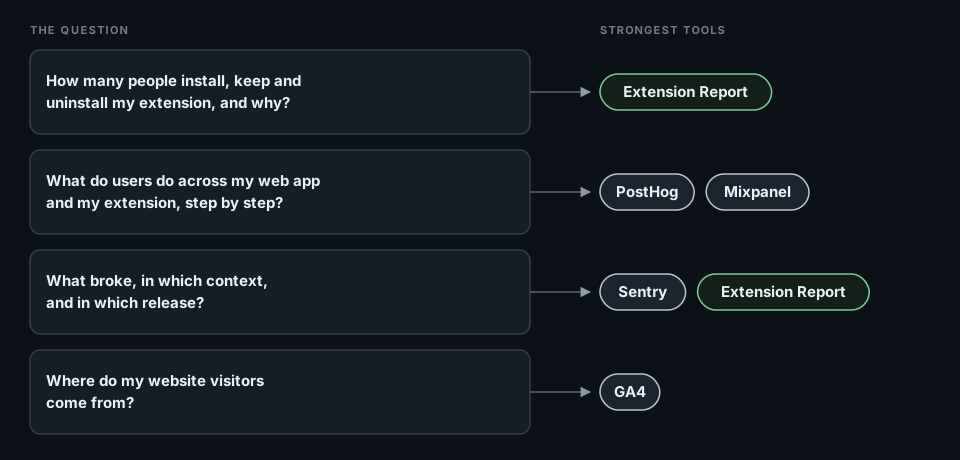
Tools are easier to compare once you know which question each one answers well. Most extension teams have four:
At a glance, inside a Manifest V3 extension
| Runs in the service worker | Installs, updates, versions | Uninstalls | Errors | Extension guide | |
|---|---|---|---|---|---|
| GA4 | Measurement Protocol only. gtag.js is remote code. | You send them | No | You send them | Chrome's GA4 tutorial |
| PostHog | Yes, with the module.no-external build and persistence: 'memory' | You send them | No | Opt-in: captureExtensionExceptions | Yes |
| Mixpanel | Through the HTTP /track endpoint with the project token | You send them | No | You send them | None found |
| Sentry | With a manual BrowserClient, not Sentry.init() | Versions as releases. No installs. | No | Its core product | Shared environments page |
| Extension Report | Yes, built for it | Automatic | Automatic, with reasons and a webhook | Grouped and redacted | Yes, and an agent playbook |
Google Analytics 4
Good at: website traffic and marketing attribution, free of charge. If your landing page and ads already report to GA4, the people who decide on marketing are there.
Inside an extension: the gtag.js snippet is remotely hosted code, which Manifest V3 does not allow. Chrome's tutorial uses the Measurement Protocol instead: fetch() calls with an API secret shipped in the extension. Google describes the protocol as a way to augment automatic collection, not replace it, and warns that reporting may be partial. Event-level data used by explorations is kept 2 or 14 months on standard properties.
Falls short on: installs, versions and uninstalls, which GA4 has no model for, and the client you have to write: identity, sessions, queue, retries. Details in How to add analytics to a Manifest V3 extension.
PostHog
Good at: product analytics, feature flags, experiments, surveys and session replay in one tool, with a free tier of 1,000,000 product analytics events per month.
Inside an extension: PostHog has a dedicated browser extension guide. You import posthog-js/dist/module.no-external and set disable_external_dependency_loading: true so nothing is loaded at run time. In the service worker it runs with persistence: 'memory', without replay, surveys or autocapture, since there is no DOM. You share one distinct_id across contexts yourself, through chrome.storage.local. Exception capture in extensions is off until you enable captureExtensionExceptions. For replay, the guide points to the posthog-recorder bundle, because the default one contains base64-encoded code, which the guide calls the most common cause of store rejections.
Falls short on: the extension lifecycle (installs, updates, uninstalls) and per-context setup. Its own guide warns that poor distinct_id handling can create billing issues.
Mixpanel
Good at: funnels, retention and cohort analysis on product events, with up to 1M events per month free.
Inside an extension: we found no browser extension guide in Mixpanel's documentation. Its /track HTTP endpoint is recommended for client-side tracking where Mixpanel has no SDK support, authenticates with the project token, and accepts up to 2,000 events per request with an $insert_id for deduplication. From the service worker, that is the path, and you write the queue and identity around it.
Falls short on: everything specific to extensions, which you build: identity across contexts, persistence across worker restarts, installs and uninstalls.
Sentry
Good at: error tracking: grouping, stack traces, source maps, alerts, releases, and integrations with the rest of your stack. The free Developer plan covers 1 user and 5,000 errors per month.
Inside an extension: Sentry's shared environments page, which lists browser extensions, says not to use Sentry.init() there because it pollutes global state, and errors can cross between your project and a website's own Sentry. You create a BrowserClient and a Scope yourself and remove the integrations that use global state. One of them, BrowserSession, is the integration that tracks sessions for Release Health.
Falls short on: the denominator. Sentry is not an analytics tool: it does not know how many installations run each version, or how many uninstalled after an error.
Extension Report
Good at: the extension itself. One SDK initialization in the service worker records installs, updates, active installations, versions, popup and side panel use, permissions, errors and uninstalls with their reasons. It reads your Chrome Web Store, Edge and Firefox listings next to it. It can ask installed copies to fetch a version already published on the store, and send your backend a signed webhook on each uninstall. An AI agent can set it all up through MCP.
Falls short on: anything outside the extension. It does not measure your website, has no session replay and no A/B experiment engine. Its product analytics are lighter than PostHog's or Mixpanel's. It is also a younger product than every other tool on this page.
Free plan: 1 extension, 1,000 monthly active users, 30-day history.
Store and privacy constraints apply to every tool
- Chrome Web Store: in the Privacy practices tab you declare the types of data the extension collects and certify that you follow the Limited Use policy. Your privacy policy must match.
- Firefox: since 3 November 2025, new extensions must use Firefox's built-in data collection consent. Technical and interaction data (device and browser info, usage, crash and error reports) must be declared as optional. Whatever tool you use, send nothing until the user grants it. The Extension Report SDK checks the grant itself.
- Session replay and page URLs record what users see on other sites. If you enable them, your disclosure has to say so.
- Identity: prefer a random installation id over emails or account ids in analytics. Extension Report uses no cookies and does not keep raw IP addresses.
Free tiers and the first paid step
| Tool | Free | Beyond the free tier |
|---|---|---|
| GA4 | Free of charge (standard properties) | Not covered here |
| PostHog | 1,000,000 product analytics events per month | $0.00005 per event from 1 to 2 million |
| Mixpanel | Up to 1M events per month | Growth: 1.5M events per month is $140 billed monthly |
| Sentry | Developer: 1 user, 5,000 errors per month | Team: $29 per month billed monthly, 50,000 errors |
| Extension Report | 1 extension, 1,000 monthly active users, 30-day history | See pricing |
What we would pick
- You already run PostHog or Mixpanel for your web app and want one place for product analytics: keep it, follow PostHog's extension guide, and add the lifecycle events yourself.
- Errors are your main risk and you want deep triage: Sentry with a manual client. Extension Report gives it the denominator.
- You need the extension's own numbers: installs, actives per version, uninstalls and why, store data, errors per release: Extension Report.
- Marketing attribution for your website: GA4 on the website. Avoid making it your extension analytics.
Combining two tools is common and fine. Pick each for the question it answers best.
Do it with your AI agent
Let your agent set it up while you read the next guide.
Paste the request below into Claude Code, Codex or Cursor. Your agent connects to Extension Report through MCP, creates your account and the project, installs the SDK in your code and checks that events arrive. You sign in once and approve access. Extension Report never sees your code: the agent edits it on your machine.
1. Connect https://mcp.extension.report
claude mcp add --transport http extension-report https://mcp.extension.report
codex mcp add extension-report --url https://mcp.extension.report
2. Ask your agent
Add Extension Report to this browser extension next to our existing analytics. Follow https://extension.report/docs/agents.txt.
The full playbook your agent follows: /docs/agents.
Prefer to do it yourself?
Free plan: 1 extension, 1,000 monthly active users, 30-day history.
Sources
- Chrome for Developers: Use Google Analytics 4 in an extension
- Google Analytics: Measurement Protocol overview
- Google Analytics Help: data retention
- Google Marketing Platform: Google Analytics
- PostHog: Using PostHog for browser extensions
- PostHog: Product analytics pricing
- Mixpanel: Track events (Ingestion API)
- Mixpanel: Pricing
- Sentry: Using Sentry in shared environments
- Sentry: BrowserSession integration
- Sentry: Pricing
- Chrome Web Store: Fill out the privacy fields
- Firefox Extension Workshop: built-in data collection consent